Project Setup
In this chapter, you will learn how to create and register UserKey and AppId, etc. required for authentication for using AI Human SDK.
1. Download SDK
You can download SDKs for each platform here. AI Human SDK Website.
2. Create an Xcode project and cocoapods
Create project to use the AI Human SDK in the Xcode.
Add the AIPlayer.podspec file and the AIPlayer folder to the Project folder.
3. Setup the project
Changing the terminal path to the location of the project.
3.1. Create Podfile
Create a cocoapods configuration file.
- Cocoapods is a library dependency management manager that allows you to use numerous Xcode project libraries.
- You can find out how to install and use it at cocoapods.
cd /project_path
pod init
3.2. Add and install pod 'AIPlayerSDK'
Open the generated podfile and add AIPlayerSDK.
To use 3D characters, pod 'AIPlayerSDK/Include3D' must be added.
If there is a problem that the library cannot be found during execution, the post_install part should be added.
target 'your project' do
  # Comment the next line if you don't want to use dynamic frameworks
  use_frameworks!

  # Pods for your project
	pod 'AIPlayerSDK', :path => '.'  // Add an AIPlayer SDK with 2D
  #pod 'AIPlayerSDK/Include3D', :path => '.'  // Add an AIPlayer SDK with 2D and 3D enabled

  target 'your project tests' do
    inherit! :search_paths
    # Pods for testing
  end

  target 'your project UITests' do
    # Pods for testing
  end

end

# enable cocoapods BUILD_LIBRARY_FOR_DISTRIBUTION
post_install do |installer|
    installer.pods_project.targets.each do |target|
        target.build_configurations.each do |config|
            config.build_settings['BUILD_LIBRARY_FOR_DISTRIBUTION'] = 'YES'
        end
    end
end
For the objective c project, you must add
ENV['SWIFT_VERSION'] = '5'
to the podfile.
After saving the podfile, you can add the library through the command below in the terminal.
pod install
3-3. Change project setting
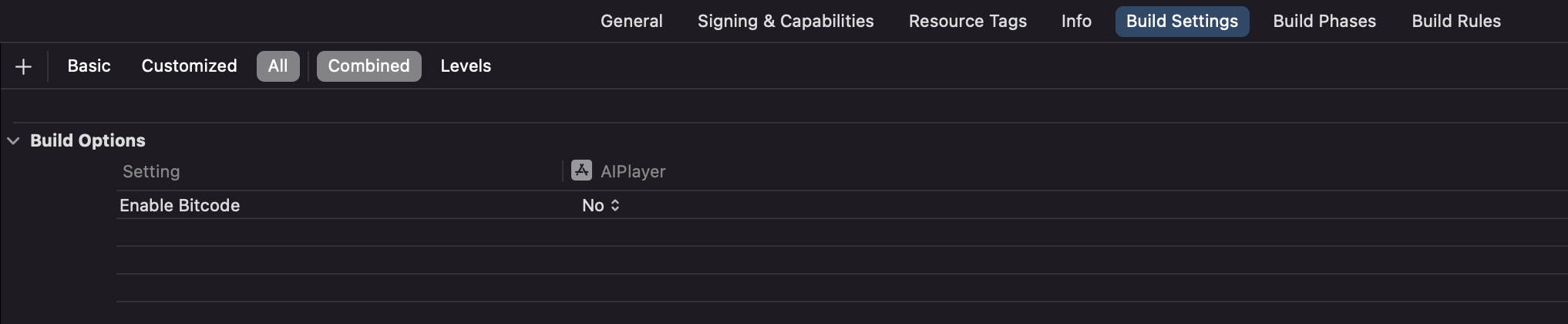
After running the .xcworkspace file, disable Enable Bitcode in the build settings of the project.
4. Notes for reference
-
AIPlayer SDK works with iOS 11.0 or later.
-
AIPlayer SDK works with Swift 5 or later.
-
To use AIPlayer SDK, You must work with xCode 12 or later
-
Note1: For SDKs with 3D, it is not possible to build on the simulator.
-
Note2: Currently, SDK including 3D cannot be debugged on iOS 16 and later devices.